Thirty-two games
Each one complete, with its own rules, its own statistics and its own file, split into five families inside the menu.

Premium
Thirty-two minigames on one engine, fourteen arenas playable tonight.
Included in Shadow Server - Crystal and in every tier above: with the subscription it stays active and updated for as long as it runs, on 3 servers. See the tiers.
29.99 € Stable Gameplay and content
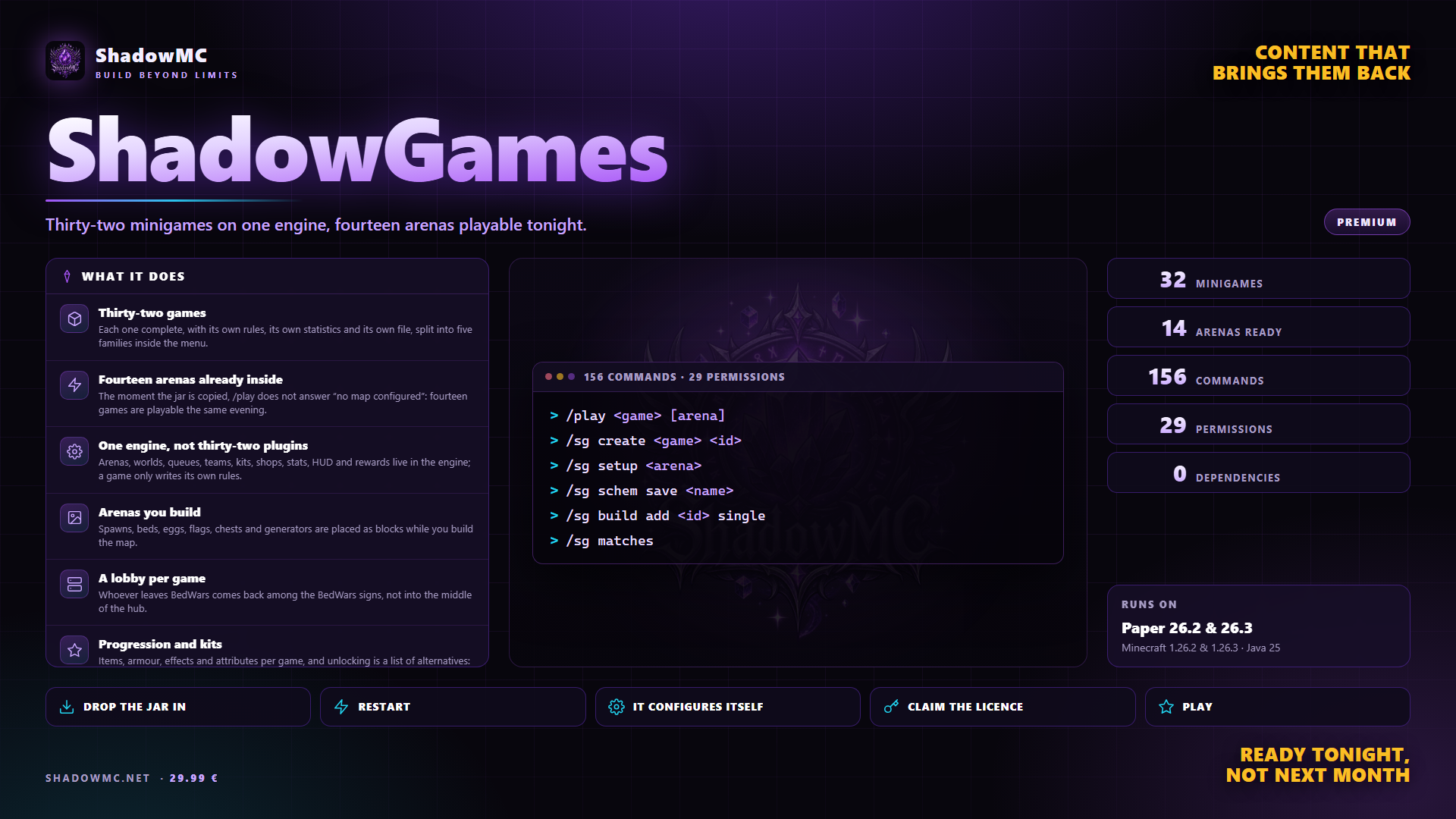
Each one complete, with its own rules, its own statistics and its own file, split into five families inside the menu.
The moment the jar is copied, /play does not answer “no map configured”: fourteen games are playable the same evening.
Arenas, worlds, queues, teams, kits, shops, stats, HUD and rewards live in the engine; a game only writes its own rules.
Spawns, beds, eggs, flags, chests and generators are placed as blocks while you build the map.
Whoever leaves BedWars comes back among the BedWars signs, not into the middle of the hub.
Items, armour, effects and attributes per game, and unlocking is a list of alternatives: permission, game coins, real currency or level.
| Command | Description | Aliases | Permission |
|---|---|---|---|
| /chatgames | Chat games: the first right answer wins | /chatgame | — |
| /games | Open the minigames menu | /minigames /gamelist | shadowgames.player.menu |
| /gkit | Choose your kit for the match | /kitgame | shadowgames.player.kit |
| /gstats | Show your minigame stats | /gamestats | shadowgames.player.stats |
| /gtop | Show a leaderboard | /leaderboard | shadowgames.player.top |
| /leave | Leave the match or the queue | /quitgame /lv | shadowgames.player.leave |
| /parkour | The lobby parkour courses | /pk /course | shadowgames.player.parkour |
| /party | Manage your party | /p /team | shadowgames.player.party |
| /play | Join a match | /join /pl | shadowgames.player.play |
| /shadowgames | ShadowGames administration | /sg /sgames | shadowgames.admin |
| /spectate | Watch a running match | /spec /watch | shadowgames.player.spectate |
| /tournament | Join a tournament and follow it | /tourney /cup | shadowgames.player.tournament |
| Command | What it does | Permission |
|---|---|---|
| /play <game> [arena] | Joins a match. With no arguments it opens the picker; with random, the same. | shadowgames.player.play |
| /leave | Leaves the match, or the queue if you are still waiting. | shadowgames.player.leave |
| /games | The game picker. | shadowgames.player.menu |
| /games list | The same games in chat, with maps and players. | shadowgames.player.menu |
| /games info <game> | Category, maps in total, maps ready, matches running. | shadowgames.player.menu |
| /games settings | The seven personal switches. | shadowgames.player.menu |
| /games kits <game> | A game's kits, from outside a match as well. | shadowgames.player.menu |
| /games cosmetics | The cosmetics you have unlocked and the ones you have not. | shadowgames.player.menu |
| /games achievements [game] | The achievements and how far along you are. | shadowgames.player.menu |
| /gkit [kit] | In a match that has not started: the kit menu, or the direct pick. | shadowgames.player.kit |
| /gstats [player] [game] | The statistics panel, yours or somebody else's. | shadowgames.player.stats |
| /gtop <game> [key] [n] | One leaderboard. * in place of the game counts across them all. | shadowgames.player.top |
| /spectate <player|arena> | Joins a running match as a spectator. | shadowgames.player.spectate |
| /party | Your party: who is in it and who leads it. | shadowgames.player.party |
| /party create|leave|disband | Create the party, leave, break it up. | shadowgames.player.party |
| /party invite|accept|kick <player> | Invitations, acceptances and removals. | shadowgames.player.party |
| /party leader <player> | Hands the lead to somebody else. | shadowgames.player.party |
| /party chat <text> | Speaks to the party only. | shadowgames.player.party |
| /party play <game> [arena] | You all go in together, or nobody does. | shadowgames.player.party |
| /parkour [course] | The courses menu, or start straight away on that one. | shadowgames.player.parkour |
| /parkour list | The courses in chat, with your record on each. | shadowgames.player.parkour |
| /parkour reset|restart|leave | Back to the last checkpoint, start over, leave. | shadowgames.player.parkour |
| /tournament | The tournaments coming up, with how long until entries open. | shadowgames.player.tournament |
| /tournament join [id] | Enter; with no id, the first one open. | shadowgames.player.tournament |
| /tournament leave | Withdraw. | shadowgames.player.tournament |
| /tournament info [id] | The bracket, drawn in chat. | shadowgames.player.tournament |
| Command | What it does | Permission |
|---|---|---|
| /sg create <game> <id> | Creates the arena and opens the setup straight away. | shadowgames.admin.arena |
| /sg delete <arena> | Deletes an arena. | shadowgames.admin.arena |
| /sg clone <arena> <new-id> | Copies an arena under another name. | shadowgames.admin.arena |
| /sg enable <arena> | Switches an arena on. | shadowgames.admin.arena |
| /sg disable <arena> | Switches it off without deleting it. | shadowgames.admin.arena |
| /sg list [game] | The list, with state and open instances. | shadowgames.admin |
| /sg info <arena> | The full card, with the problems at the bottom. | shadowgames.admin |
| /sg check [arena] | What is missing before it can be played. | shadowgames.admin |
| Command | What it does | Permission |
|---|---|---|
| /sg setup <arena> | Reopens the session on an arena that already exists. | shadowgames.admin.setup |
| /sg setup exit | Closes the session. | shadowgames.admin.setup |
| /sg wand | Hands you the wand: selection and the marker menu. | shadowgames.admin.setup |
| /sg pos1 | The two corners, taken from where you are standing. | shadowgames.admin.setup |
| /sg set <key> [value] | The arena's numbers, names and points. | shadowgames.admin.setup |
| /sg marker list [game] | Which block counts as which marker. | shadowgames.admin.setup |
| /sg marker give <type> [parameter] | Puts that marker in your hand. | shadowgames.admin.setup |
| /sg marker clear <type> | Removes every marker of that type. | shadowgames.admin.setup |
| /sg team add <name> [colour] [label] [slots] | Declares a team. | shadowgames.admin.setup |
| /sg team remove <name> | Removes it. | shadowgames.admin.setup |
| /sg team color <name> <colour> | Changes the colour. | shadowgames.admin.setup |
| /sg team size <n> | Players per team. | shadowgames.admin.setup |
| /sg team list | The teams, declared or generated by the engine. | shadowgames.admin.setup |
| /sg finish | Validates, enables and closes - only if nothing is missing. | shadowgames.admin.setup |
| /sg discard | Closes the session without enabling. The file stays. | shadowgames.admin |
| Command | What it does | Permission |
|---|---|---|
| /sg schem save <name> | Saves the selection as Sponge v3. | shadowgames.admin.schem |
| /sg schem list [folder] | What is in schematics/. | shadowgames.admin.schem |
| /sg schem info <file> | Format, measurements, blocks, palette, block entities. | shadowgames.admin.schem |
| /sg schem paste <file> [degrees] | Pastes where you are standing, rotated by 0, 90, 180 or 270. | shadowgames.admin.schem |
| /sg schem undo | Undoes the last paste. | shadowgames.admin.schem |
| /sg schem convert <file> | Rewrites an old format as Sponge v3. | shadowgames.admin.schem |
| /sg schem cache | Empties the cache of schematics held in memory. | shadowgames.admin.schem |
| Command | What it does | Permission |
|---|---|---|
| /sg build add <id> single | One component where you are standing. | shadowgames.admin.build |
| /sg build add <id> ring <radius> <n> | N positions in a circle, one per team. | shadowgames.admin.build |
| /sg build add <id> grid <rows> <columns> <step> | A grid, one per player. | shadowgames.admin.build |
| /sg build schem <id> <file> | A single schematic for that component. | shadowgames.admin.build |
| /sg build pool <id> add <file> [weight] | Adds a schematic to the pool. | shadowgames.admin.build |
| /sg build pool <id> remove <file> | Takes it out. | shadowgames.admin.build |
| /sg build pool <id> list | The pool, with the weights. | shadowgames.admin.build |
| /sg build list | The components of the arena being set up. | shadowgames.admin.build |
| /sg build preview | Builds the arena and takes you inside it. | shadowgames.admin.build |
| /sg build remove <id> | Removes a component. | shadowgames.admin.build |
| /sg build clear | Removes every component. Markers and spawns stay. | shadowgames.admin.build |
| Command | What it does | Permission |
|---|---|---|
| /sg matches | The matches running, with state, players alive and time. | shadowgames.admin |
| /sg start <arena|id> | Starts a waiting match right now. | shadowgames.admin.match |
| /sg stop <arena|id> | Calls a match off, saying who did it. | shadowgames.admin.match |
| /sg stopall | Calls them all off. | shadowgames.admin.match |
| /sg join <arena|id> [--force] | Joins; with --force even if it is full or already started. | shadowgames.admin.match |
| /sg watch <arena|id> | Watches a match from inside, from anywhere. | shadowgames.admin.match |
| /sg kick <player> | Takes them out of whichever match they are in. | shadowgames.admin.match |
| /sg move <player> <arena> | Moves them to another match. | shadowgames.admin.match |
| /sg world list | The match worlds that are open, with players and entities. | shadowgames.admin.world |
| /sg world clean | Deletes the worlds left orphaned. | shadowgames.admin.world |
| /sg world template list | The templates available. | shadowgames.admin.world |
| /sg world template save <world> [name] | Saves a world as a template. | shadowgames.admin.world |
| /sg world preload <arena> | Builds an instance in advance. It works from the console as well. | shadowgames.admin.world |
| /sg coins give|take|set <player> <n> | The in-game coins. | shadowgames.admin.economy |
| /sg xp <player> <n> | Adds experience. | shadowgames.admin.economy |
| /sg level set <player> <n> | Sets the level. | shadowgames.admin.economy |
| /sg booster give <player> [x] [duration] | A personal, timed multiplier. | shadowgames.admin.economy |
| /sg booster clear <player> | Takes it away again. | shadowgames.admin.economy |
| /sg multiplier <x> [duration] | A multiplier for the whole server, for an event. | shadowgames.admin.economy |
| /sg multiplier off | Switches it off. | shadowgames.admin.economy |
| /sg cosmetic list | Every cosmetic, by type. | shadowgames.admin.economy |
| /sg cosmetic give <player> <id> | Gifts one, without making them spend coins. | shadowgames.admin.economy |
| /sg stats reset <player> [game] | Resets the statistics. | shadowgames.admin.stats |
| /sg stats set <player> <game> <key> <n> | Corrects a value. | shadowgames.admin.stats |
| /sg stats export [csv|json] | Exports the whole table to a file. | shadowgames.admin.stats |
| /sg stats kit <game> | Kit balance: how often they are picked and how often they win. | shadowgames.admin.stats |
| /sg profile [player] | A player's card. With no name it shows the server's timings. | shadowgames.admin |
| Command | What it does | Permission |
|---|---|---|
| /sg lobby | The lobbies you set, and where they are. | shadowgames.admin.lobby |
| /sg lobby set [name] | Puts a lobby where you are standing. With no name, main. | shadowgames.admin.lobby |
| /sg lobby remove <name> | Removes it. | shadowgames.admin.lobby |
| /sg lobby tp [name] | Takes you there. | shadowgames.admin.lobby |
| /sg lobby game <game> <name> | Which lobby whoever leaves that game ends up in. | shadowgames.admin.lobby |
| /sg holo create <id> <game|*> [key] [n] | Hangs a leaderboard where you are standing. | shadowgames.admin.lobby |
| /sg holo move <id> | Moves it to where you are, keeping the settings. | shadowgames.admin.lobby |
| /sg holo remove <id> | Takes it down. | shadowgames.admin.lobby |
| /sg holo list | The leaderboards hanging. | shadowgames.admin.lobby |
| /sg npc create <game> [arena] | An entry point where you are standing. | shadowgames.admin.lobby |
| /sg npc remove <id> | Removes it. | shadowgames.admin.lobby |
| /sg npc refresh | Redraws them all. | shadowgames.admin.lobby |
| /sg npc list | The entry points. | shadowgames.admin.lobby |
| /sg parkour list | The courses, with mode, level and checkpoints. | shadowgames.admin.lobby |
| /sg parkour set <id> start|checkpoint|finish | Puts the point where you are standing. | shadowgames.admin.lobby |
| /sg parkour set <id> undo|clear | Removes the last point, or all of them. | shadowgames.admin.lobby |
| /sg parkour mode <id> <mode> | CHECKPOINT, PERSISTENT or ONESHOT. | shadowgames.admin.lobby |
| /sg parkour time <id> <duration|0> | A time limit; 0 removes it. | shadowgames.admin.lobby |
| /sg parkour progress <player> <id> | Resets the progress saved on a persistent course. | shadowgames.admin.lobby |
| /sg parkour tp <id> | Takes you to the start. | shadowgames.admin.lobby |
| /sg parkour delete <id> | Deletes the course. | shadowgames.admin.lobby |
| /sg parkour reload | Re-reads the folder. | shadowgames.admin.lobby |
| Command | What it does | Permission |
|---|---|---|
| /sg tournament list | The tournaments and how they stand. | shadowgames.admin.tournament |
| /sg tournament create <id> <game> [format] [entries] [name] [per-team] | Creates one. Format ELIMINATION or ROUND_ROBIN. | shadowgames.admin.tournament |
| /sg tournament info <id> | Game, format, state and entrants with their seeding. | shadowgames.admin.tournament |
| /sg tournament start <id> | Closes entries at once and starts it. | shadowgames.admin.tournament |
| /sg tournament cancel <id> [reason] | Calls it off, saying why. | shadowgames.admin.tournament |
| /sg tournament delete <id> | Deletes it. | shadowgames.admin.tournament |
| /sg ranked [player] | Rating and division in every ranked game. | shadowgames.admin.stats |
| /sg ranked season [name] | The season running, or opens a new one. | shadowgames.admin.stats |
| /sg ranked set <player> <game> [points] | Corrects a rating. | shadowgames.admin.stats |
| /sg ranked divisions | The eight divisions and their thresholds. | shadowgames.admin.stats |
| /sg achievement list | The achievements, with their levels and the final goal. | shadowgames.admin.stats |
| /sg achievement give <player> <id> [level] | Awards one. | shadowgames.admin.stats |
| /sg achievement check <player> | Re-checks all of their thresholds. | shadowgames.admin.stats |
| Command | What it does | Permission |
|---|---|---|
| /sg help | The families of commands, on one screen. | shadowgames.admin |
| /sg status | Storage, games, arenas, matches, worlds, schematics, kits, lobbies, integrations and errors. | shadowgames.admin |
| /sg version | The version running. | shadowgames.admin |
| /sg reload [what] | Reloads without a restart: config, lang, games, arenas, kits, shops, cosmetics, or everything. | shadowgames.admin |
| /sg config [key] [value] | Reads or changes a key, and says where it really comes from. | shadowgames.admin.config |
| /sg lang list | The languages loaded, with how many keys each one is missing. | shadowgames.admin.config |
| /sg lang missing [language] | Which keys are missing, one per line. | shadowgames.admin.config |
| /sg perms <player> | Which of our nodes they really hold. It settles almost every report. | shadowgames.admin.debug |
| /sg debug [on|off] | Switches the profiler on and off. | shadowgames.admin.debug |
| /sg timings | The fifteen slowest spots, with calls, average and worst. | shadowgames.admin.debug |
| /sg error [id] | The errors on record; with the id, the full trace. | shadowgames.admin.debug |
| /sg network | The state of the network's servers and of the proxy. | shadowgames.admin.debug |
| /sg storage info | Type, prefix, schema version, size and rows per table. | shadowgames.admin.storage |
| /sg storage migrate | Copies the local database into the MySQL from the config. | shadowgames.admin.storage |
| /sg backup | Configuration, arenas, kits and database in a dated zip. | shadowgames.admin.storage |
| /sg backup list | The backups made, with date and size. | shadowgames.admin.storage |
| /sg license | Edition, status, days, limits and server fingerprint. | shadowgames.admin.license |
| /sg license activate <key> | Activates a key. | shadowgames.admin.license |
| /sg license claim <code> | Has the server request the key, already tied to its addresses. | shadowgames.admin.license |
| /sg license refresh | Checks again right now. | shadowgames.admin.license |
| /sg import list | The formats it can read. | shadowgames.admin.arena |
| /sg import <format|auto> <folder> | Reads another plugin's arenas. | shadowgames.admin.arena |
| Command | What it does | Permission |
|---|---|---|
| /sg import bedwars1058 <folder> | BedWars1058. | — |
| /sg import bedwars2023 <folder> | BedWars2023. | — |
| /sg import mbedwars <folder> | MBedwars. | — |
| /sg import skywarsreloaded <folder> | SkyWars Reloaded. | — |
| /sg import auto <folder> | When you do not know which. | — |
| Node | What it grants | By default |
|---|---|---|
| shadowgames.player.play | Join a match | Everyone |
| shadowgames.player.leave | Leave a match | Everyone |
| shadowgames.player.menu | Open the game picker | Everyone |
| shadowgames.player.kit | Pick a kit | Everyone |
| shadowgames.player.tournament | Enter the tournaments | Everyone |
| shadowgames.player.parkour | Run the lobby's parkour courses | Everyone |
| shadowgames.player.party | Use the parties | Everyone |
| shadowgames.player.spectate | Watch a match | Everyone |
| shadowgames.player.stats | See your own statistics | Everyone |
| shadowgames.player.stats.others | See other players' statistics | Everyone |
| shadowgames.player.top | See the leaderboards | Everyone |
| shadowgames.chatgames.play | Take part in chat games and hide them for yourself | Everyone |
| shadowgames.bypass.protection | Build and break even where the match forbids it | Operators |
| shadowgames.bypass.commands | Use outside commands during a match | Operators |
| shadowgames.admin.arena | Create, delete and enable arenas | Operators |
| shadowgames.admin.setup | Setup sessions, markers, selection | Operators |
| shadowgames.admin.build | An arena's components and layout | Operators |
| shadowgames.admin.schem | Save, paste and convert schematics | Operators |
| shadowgames.admin.match | Start, stop and move matches | Operators |
| shadowgames.admin.world | Match worlds and templates | Operators |
| shadowgames.admin.economy | Coins, xp, levels, boosters, multipliers | Operators |
| shadowgames.admin.stats | Reset, correct and export the statistics | Operators |
| shadowgames.admin.lobby | Lobbies, signs, holograms, entry points | Operators |
| shadowgames.admin.sign | Create and remove the entry signs | Operators |
| shadowgames.admin.config | Read and change configuration and languages | Operators |
| shadowgames.admin.debug | Profiler, permissions, recorded errors | Operators |
| shadowgames.admin.license | See and activate the licence | Operators |
| shadowgames.admin.storage | Database, migration, backup | Operators |
| shadowgames.admin.tournament | Create, start and cancel tournaments | Operators |
| shadowgames.chatgames.admin | Start, stop, list and reload chat games | Operators |
| shadowgames.admin · 18 children | The whole of ShadowGames administration | Operators |
There are no screenshots yet. When there are they show up here, and in the meantime saying so beats filling the space.
Arenas, worlds, queues, teams, kits, shops, stats, HUD and rewards live in the engine; a game only writes its own rules. Arenas are built by placing marker blocks while you build the map.
Trentadue minigiochi normalmente sono trentadue plugin: trentadue configurazioni diverse, trentadue modi di definire un'arena, trentadue sistemi di statistiche che non si parlano, e trentadue autori da aspettare quando Minecraft cambia versione.
plugins folder of your Paper server.license claim SG-XXXX-XXXX.None of these has to be installed, except the ones marked required: when it is there, ShadowGames uses it; when it is missing, it works all the same.