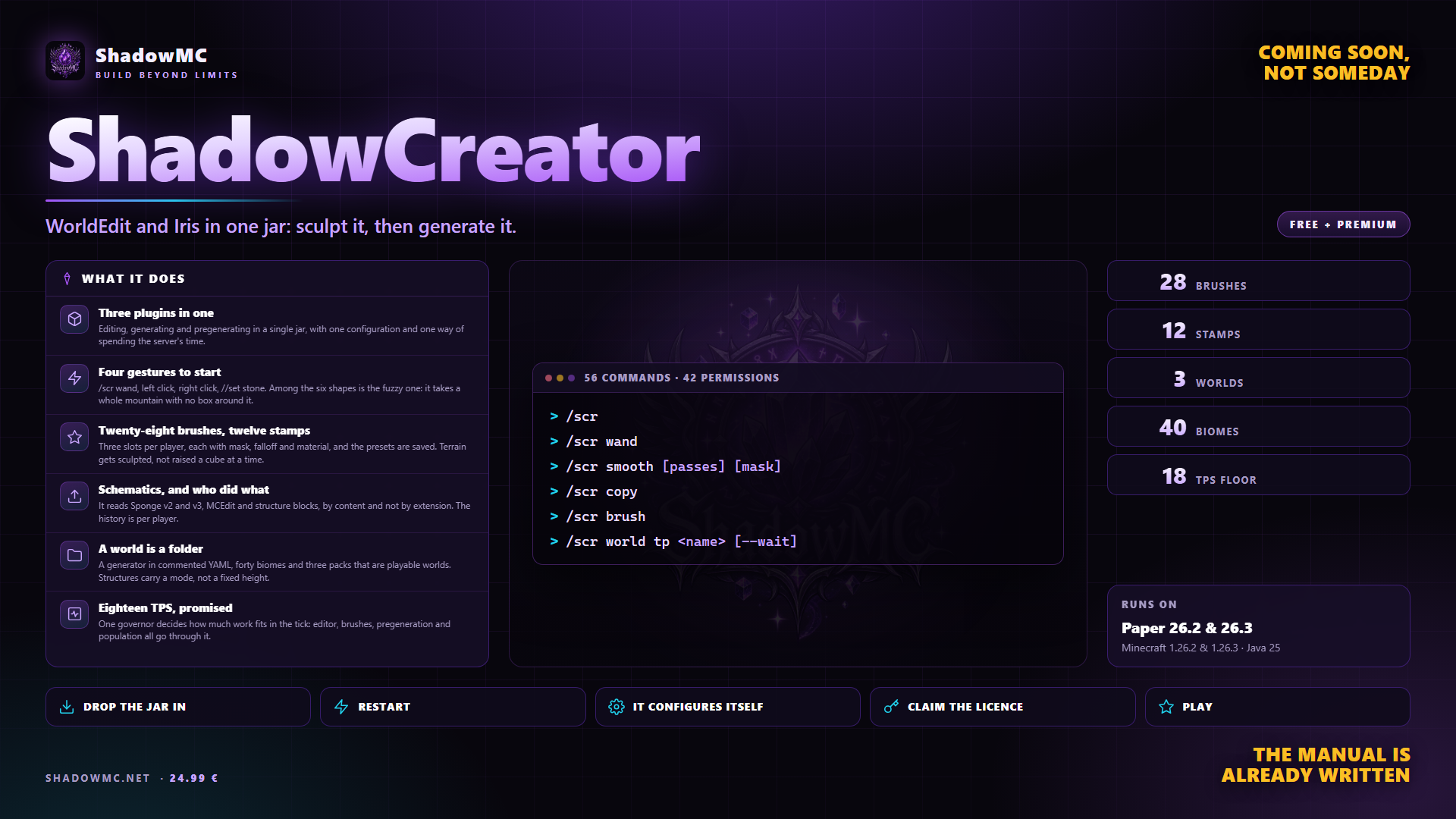
Three plugins in one
Editing, generating and pregenerating in a single jar, with one configuration and one way of spending the server's time.

Free with Premium
The world editor and the world generator in one jar: sculpt it, then generate it.
Included in Shadow Server - Crystal and in every tier above: with the subscription it stays active and updated for as long as it runs, on 3 servers. See the tiers.
24.99 € Stable Gameplay and content
Editing, generating and pregenerating in a single jar, with one configuration and one way of spending the server's time.
/shadowedit wand, left click, right click, //set stone. Among the six shapes is the fuzzy one: it takes a whole mountain with no box around it.
Three slots per player, each with mask, falloff and material, and the presets are saved. Terrain gets sculpted, not raised a cube at a time.
It reads Sponge v2 and v3, MCEdit and structure blocks, by content and not by extension. The history is per player.
A generator in commented YAML, forty biomes and three packs that are playable worlds. Structures carry a mode, not a fixed height.
One governor decides how much work fits in the tick: editor, brushes, pregeneration and population all go through it.
| Command | Description | Aliases | Permission |
|---|---|---|---|
| /shadowedit | World editing and world generation (alias /sedit) | /sedit | — |
| Command | What it does | Permission |
|---|---|---|
| /shadowedit | Opens the main panel; from the console it prints the help. Alias /sedit. | shadowedit.use |
| //set, //pos1, //copy, //paste... | Every editor command also has the short WorldEdit-style form: //<command> is /shadowedit <command>. | — |
| /shadowedit help [topic] | This help, split by topic | shadowedit.use |
| /shadowedit menu | Opens the main panel | shadowedit.use |
| /shadowedit status | Version, licence, queue, TPS and memory | shadowedit.admin.status |
| /shadowedit diag | Full diagnostics, for support | shadowedit.admin.diag |
| /shadowedit reload | Reloads config, languages, palettes and packs | shadowedit.admin.reload |
| /shadowedit lang [language] | Shows or changes your language | shadowedit.use |
| /shadowedit license [activate <key> | remove | reload] | Licence status; activates or removes the key | shadowedit.admin.license |
| Command | What it does | Permission |
|---|---|---|
| /shadowedit wand | Gives you the selection wand | shadowedit.edit.selection |
| /shadowedit toggleeditwand | Turns the selection wand on or off | shadowedit.edit.selection |
| /shadowedit sel [cuboid|sphere|cylinder|ellipsoid|polygon|fuzzy | here [radius] | region <name> | last | chunk] | Picks the selection shape, or a shortcut | shadowedit.edit.selection |
| /shadowedit pos1 [x y z] | First point: where you stand, or x y z | shadowedit.edit.selection |
| /shadowedit pos2 [x y z] | Second point: where you stand, or x y z | shadowedit.edit.selection |
| /shadowedit hpos1 | First point on the block you look at | shadowedit.edit.selection |
| /shadowedit hpos2 | Second point on the block you look at | shadowedit.edit.selection |
| /shadowedit expand <amount|vert> [direction] | Enlarges the selection (vert: full height) | shadowedit.edit.selection |
| /shadowedit contract <amount> [direction] | Shrinks the selection in one direction | shadowedit.edit.selection |
| /shadowedit shift <amount> [direction] | Moves the selection, not the blocks | shadowedit.edit.selection |
| /shadowedit outset <amount> | Enlarges the selection on every side | shadowedit.edit.selection |
| /shadowedit inset <amount> | Shrinks the selection on every side | shadowedit.edit.selection |
| /shadowedit chunk | Selects the chunk you are standing in | shadowedit.edit.selection |
| /shadowedit desel | Clears the selection | shadowedit.edit.selection |
| /shadowedit size | Size and volume of the selection | shadowedit.edit.selection |
| /shadowedit count <mask> | Counts the blocks that match a mask | shadowedit.edit.selection |
| /shadowedit distr [-c] | Blocks in the selection, by material (-c: with air) | shadowedit.edit.selection |
| Command | What it does | Permission |
|---|---|---|
| /shadowedit set <pattern> | Fills the selection with a pattern | shadowedit.edit.fill |
| /shadowedit replace [mask] <pattern> | Replaces blocks: all, or those matching a mask | shadowedit.edit.fill |
| /shadowedit overlay <pattern> | Puts a layer on top of every surface | shadowedit.edit.fill |
| /shadowedit underlay <pattern> | Puts a layer under every surface | shadowedit.edit.fill |
| /shadowedit walls <pattern> | Builds the side walls of the selection | shadowedit.edit.fill |
| /shadowedit outline <pattern> | Builds walls, floor and ceiling | shadowedit.edit.fill |
| /shadowedit faces <pattern> | Covers the faces of any shape, spheres too | shadowedit.edit.fill |
| /shadowedit hollow [thickness] [pattern] | Empties the inside and keeps a shell | shadowedit.edit.fill |
| /shadowedit center <pattern> | Places a block at the centre of the selection | shadowedit.edit.fill |
| /shadowedit line <pattern> [thickness] | Draws a line from point 1 to point 2 | shadowedit.edit.fill |
| Command | What it does | Permission |
|---|---|---|
| /shadowedit move [amount] [direction] [leave] [-s] | Moves the selected blocks (-s: the selection too) | shadowedit.edit.move |
| /shadowedit stack <count> [direction] [-a] [-s] | Repeats the selection in one direction (-a: skip air) | shadowedit.edit.move |
| /shadowedit rotate <degrees> | Rotates the clipboard by quarter turns | shadowedit.edit.move |
| /shadowedit flip [direction] | Mirrors the clipboard | shadowedit.edit.move |
| Command | What it does | Permission |
|---|---|---|
| /shadowedit sphere <pattern> <radius> [-h] | A sphere around you (-h: hollow) | shadowedit.edit.shape |
| /shadowedit cyl <pattern> <radius> [height] [-h] | A cylinder at your feet (-h: hollow) | shadowedit.edit.shape |
| /shadowedit pyramid <pattern> <size> [-h] | A pyramid at your feet (-h: hollow) | shadowedit.edit.shape |
| /shadowedit cone <pattern> <radius> <height> [-h] | A cone at your feet (-h: hollow) | shadowedit.edit.shape |
| /shadowedit torus <pattern> <major-radius> <minor-radius> | A torus, a ring, around you | shadowedit.edit.shape |
| Command | What it does | Permission |
|---|---|---|
| /shadowedit smooth [passes] [mask] | Smooths the terrain in the selection | shadowedit.edit.terrain |
| /shadowedit naturalize [palette] | Rewrites the surface layers, or with a palette | shadowedit.edit.terrain |
| /shadowedit erode [passes] [strength] [talus] | Erodes the terrain as weather would | shadowedit.edit.terrain |
| /shadowedit flatten [height] | Flattens the terrain to one height | shadowedit.edit.terrain |
| /shadowedit drain <radius> [-w] | Removes liquids around you (-w: water only) | shadowedit.edit.terrain |
| /shadowedit fixwater <radius> | Turns flowing water around you into still water | shadowedit.edit.terrain |
| /shadowedit fixlava <radius> | Turns flowing lava around you into still lava | shadowedit.edit.terrain |
| /shadowedit snow [radius] [thickness] | Covers the ground around you with snow | shadowedit.edit.terrain |
| /shadowedit thaw [radius] | Removes snow and ice around you | shadowedit.edit.terrain |
| /shadowedit green [radius] | Turns dirt open to the sky into grass | shadowedit.edit.terrain |
| /shadowedit fill <pattern> <radius> [depth] | Fills a hole from where you stand | shadowedit.edit.terrain |
| /shadowedit fillr <pattern> <radius> [depth] | Fills a hole from where you stand, upwards too | shadowedit.edit.terrain |
| /shadowedit removeabove [radius] [height] | Clears the blocks above you | shadowedit.edit.terrain |
| /shadowedit removebelow [radius] [depth] | Clears the blocks below you | shadowedit.edit.terrain |
| /shadowedit removenear <mask> [radius] | Removes the blocks of a mask around you | shadowedit.edit.terrain |
| Command | What it does | Permission |
|---|---|---|
| /shadowedit forest [type] [density] | Plants trees in the selection | shadowedit.edit.flora |
| /shadowedit flora [density] [pattern] | Scatters grass and flowers in the selection | shadowedit.edit.flora |
| /shadowedit tree [type] | Grows a tree on the block you look at | shadowedit.edit.flora |
| Command | What it does | Permission |
|---|---|---|
| /shadowedit copy [-e] | Copies the selection (-e: with entities) | shadowedit.edit.clipboard |
| /shadowedit cut [pattern] [-e] | Copies the selection, then empties it | shadowedit.edit.clipboard |
| /shadowedit paste [-a] [-o] [-s] [-e] [-f] | Pastes the clipboard where you stand (-a: skip air) | shadowedit.edit.clipboard |
| /shadowedit clearclipboard | Empties your clipboard | shadowedit.edit.clipboard |
| Command | What it does | Permission |
|---|---|---|
| /shadowedit schem save <name> [-f] [-e] | load|delete|info <name> | list|browse [folder] | move <name> [folder] | Saves, loads and manages schematics | shadowedit.edit.schematic |
| Command | What it does | Permission |
|---|---|---|
| /shadowedit undo [count] [-f] | Undoes your last edits | shadowedit.edit.history |
| /shadowedit redo [count] | Redoes what you undid | shadowedit.edit.history |
| /shadowedit history [menu|clear] | Your latest edits, the panel, or clears them | shadowedit.edit.history |
| /shadowedit rollback <player> <time> [-f] | Undoes what a player did in a span of time | shadowedit.admin.history |
| Command | What it does | Permission |
|---|---|---|
| /shadowedit brush [<type> [arguments] | none | slot <n> | save|load <name> | list | info | group [on|off]] | The brush in your hand (no arguments: the panel) | shadowedit.edit.brush |
| /shadowedit mask [mask] | Brush mask: which blocks it touches | shadowedit.edit.brush |
| /shadowedit gmask [mask] | Global mask, for every edit | shadowedit.edit.brush |
| /shadowedit smask [mask] | Brush source mask | shadowedit.edit.brush |
| /shadowedit strength <value> | Brush strength | shadowedit.edit.brush |
| /shadowedit falloff <linear|smooth|sharp|gauss|constant> | How the brush fades towards its edge | shadowedit.edit.brush |
| /shadowedit range <blocks> | How far the brush reaches | shadowedit.edit.brush |
| /shadowedit tracemask [mask] | Which blocks stop the brush's aim | shadowedit.edit.brush |
| /shadowedit material <pattern> | Changes the brush's pattern | shadowedit.edit.brush |
| /shadowedit sculpt [on|off] | Sculpt mode on or off | shadowedit.edit.sculpt |
| /shadowedit stamp <stamp> [radius] [height] | Puts a terrain stamp on the brush | shadowedit.edit.sculpt |
| /shadowedit palette [list | <name> | save <name> [from] | delete <name> [-f]] | Palettes: open, list, save, delete | shadowedit.edit.sculpt |
| Command | What it does | Permission |
|---|---|---|
| /shadowedit up <blocks> | Goes up, with glass under your feet | shadowedit.edit.navigation |
| /shadowedit jumpto | Takes you to the block you look at | shadowedit.edit.navigation |
| /shadowedit thru | Takes you through the wall in front of you | shadowedit.edit.navigation |
| /shadowedit ascend | Up to the next floor | shadowedit.edit.navigation |
| /shadowedit descend | Down to the next floor | shadowedit.edit.navigation |
| Command | What it does | Permission |
|---|---|---|
| /shadowedit limit <blocks> | Your block limit per edit (-1: none) | shadowedit.edit.fill |
| /shadowedit fast | Skip end-of-edit physics (water, sand), on or off | shadowedit.edit.fill |
| /shadowedit queue | The edits in the queue | shadowedit.edit.fill |
| /shadowedit cancel [all] | Stops your running edit (all: everyone's) | shadowedit.edit.fill |
| /shadowedit info | About the block you look at | shadowedit.use |
| /shadowedit confirm <code> | Confirms a large edit | shadowedit.use |
| /shadowedit superpickaxe [single|area|recursive|off] [radius] | Super pickaxe: single, area, recursive or off | shadowedit.edit.superpickaxe |
| /shadowedit regen | Regenerates the selection with the world's generator | shadowedit.edit.regen |
| /shadowedit biome [info | set <biome> | at | list | test [T] [H] [C] [E] [PV] [W]] | The biome here, painting it, the pack's biomes | shadowedit.use |
| Command | What it does | Permission |
|---|---|---|
| /shadowedit world [menu | create <name> [pack:<id>|void] [seed:<n>] [env:normal|nether|end] [border:<n>] | import <name> [pack:<id>] [env:normal|nether|end] | tp <world> [player] [--load] [--wait] | list | info [world] | load|unload <world> | delete <world> <world> | spawn | border <world> [radius] | link <world> [nether] [end] | seed [world]] | Creates, opens and manages worlds | shadowedit.use |
| Command | What it does | Permission |
|---|---|---|
| /shadowedit pack [list | info|problems <pack> | reload [pack] | copy <from> <to> | reset <pack> | wizard] | World packs: list, check, reload, copy | shadowedit.pack.view |
| Command | What it does | Permission |
|---|---|---|
| /shadowedit pregen [status|list | start [world] [radius] [square|circle] | pause|resume|stop <world> | speed [slow|normal|fast|max]] | Pregenerates the chunks of a world | shadowedit.pregen.manage |
| Command | What it does | Permission |
|---|---|---|
| /shadowedit terrain | The generator's values under your feet | shadowedit.genesis.inspect |
| /shadowedit struct [list|here] | The pack's structures, or the one you are in | shadowedit.genesis.inspect |
| /shadowedit locate <id> | The nearest structure with that id | shadowedit.genesis.inspect |
| Node | What it grants | By default |
|---|---|---|
| shadowedit.use | Use the plugin: panel, help, language | Operators |
| shadowedit.edit.selection | Wand and selection | Operators |
| shadowedit.edit.fill | set, replace, overlay, underlay, walls, outline, faces, hollow, center, line; also limit, fast, queue and cancel | Operators |
| shadowedit.edit.move | move, stack, rotate, flip | Operators |
| shadowedit.edit.terrain | smooth, naturalize, erode, flatten, drain, snow | Operators |
| shadowedit.edit.flora | forest, flora, tree | Operators |
| shadowedit.edit.shape | sphere, cyl, pyramid, cone, torus | Operators |
| shadowedit.edit.clipboard | copy, cut, paste | Operators |
| shadowedit.edit.schematic | The schematic library | Operators |
| shadowedit.edit.schematic.delete | Delete schematics | Operators |
| shadowedit.edit.brush | The brushes | Operators |
| shadowedit.edit.sculpt | Sculpt mode and the stamps | Operators |
| shadowedit.edit.history | Undo, redo, your own history | Operators |
| shadowedit.edit.navigation | up, jumpto, thru, ascend, descend | Operators |
| shadowedit.edit.superpickaxe | The super pickaxe | Operators |
| shadowedit.edit.regen | Regenerate chunks | Operators |
| shadowedit.edit.biome | Paint biomes | Operators |
| shadowedit.edit.* · 16 children | Every editor operation | Operators |
| shadowedit.limit.unlimited | No block cap | Operators |
| shadowedit.bypass.region | Edit inside other people's protected regions | Operators |
| shadowedit.bypass.readonly | Edit worlds declared read-only | Operators |
| shadowedit.bypass.confirm | No confirmation on huge operations | Nobody |
| shadowedit.admin.reload | Reload configuration, languages and packs | Operators |
| shadowedit.admin.status | See the status | Operators |
| shadowedit.admin.diag | The full diagnostics | Operators |
| shadowedit.admin.license | See and activate the licence | Operators |
| shadowedit.admin.history | Roll back what a player did (rollback) | Operators |
| shadowedit.admin.queue | Stop everyone's queued and running edits (cancel all); the queue itself is visible to anyone with edit.fill | Operators |
| shadowedit.admin.palette · 1 children | Create and delete shared palettes | Operators |
| shadowedit.admin.* · 7 children | All administration | Operators |
| shadowedit.world.create | Create worlds | Operators |
| shadowedit.world.delete | Delete worlds | Operators |
| shadowedit.world.tp | Move between the managed worlds | Operators |
| shadowedit.world.tp.others | Move another player to a world: world tp <world> <player> | Operators |
| shadowedit.world.manage | Load, unload, spawn, borders, links; the world panel, list and info (world.tp opens those too) | Operators |
| shadowedit.world.* · 5 children | All world management | Operators |
| shadowedit.pack.view | See the world packs | Operators |
| shadowedit.pack.edit | Reload packs; copy and reset them (Premium) | Operators |
| shadowedit.pack.* · 2 children | All of the world packs | Operators |
| shadowedit.pregen.manage | Start, stop and tune pregeneration (Premium) | Operators |
| shadowedit.pregen.watch | See other people's pregeneration bar | Operators |
| shadowedit.pregen.* · 2 children | All of the pregeneration | Operators |
| shadowedit.genesis.inspect | terrain, biome at/list/test, struct, locate | Operators |
| shadowedit.admin · 12 children | All of ShadowEdit | Operators |
There are no screenshots yet. When there are they show up here, and in the meantime saying so beats filling the space.
A world editor with twenty-eight brushes and twelve stamps that sculpt terrain rather than raise it, and a world generator written in commented YAML, with an overworld, a Nether and an End already built. It stops by itself below 18 TPS.
Un server che vuole un mondo suo compra tre plugin: uno per modificare (WorldEdit), uno per generare (Iris o Terra), uno per pregenerare (Chunky).
The editor is free and whole: selection, brushes, stamps, schematics and history. The world generator - packs, biomes, structures and pregeneration - is Premium and needs a licence. Past that limit you need a licence.
ShadowEdit covers what you do today with WorldEdit, FastAsyncWorldEdit, Iris, Chunky, Terra — in one jar, with no dependencies to install first.
plugins folder of your Paper server.license claim SG-XXXX-XXXX.None of these has to be installed, except the ones marked required: when it is there, ShadowEdit uses it; when it is missing, it works all the same.